PC · Xbox · PlayStation
Rainbow Six Siege Tracker Stats, Ranks & Operators
Look up any R6 player on PC, Xbox or PlayStation. See their rank, K/D, win rate, best operators and every past season, free and without ads in the way.
What you get for every player
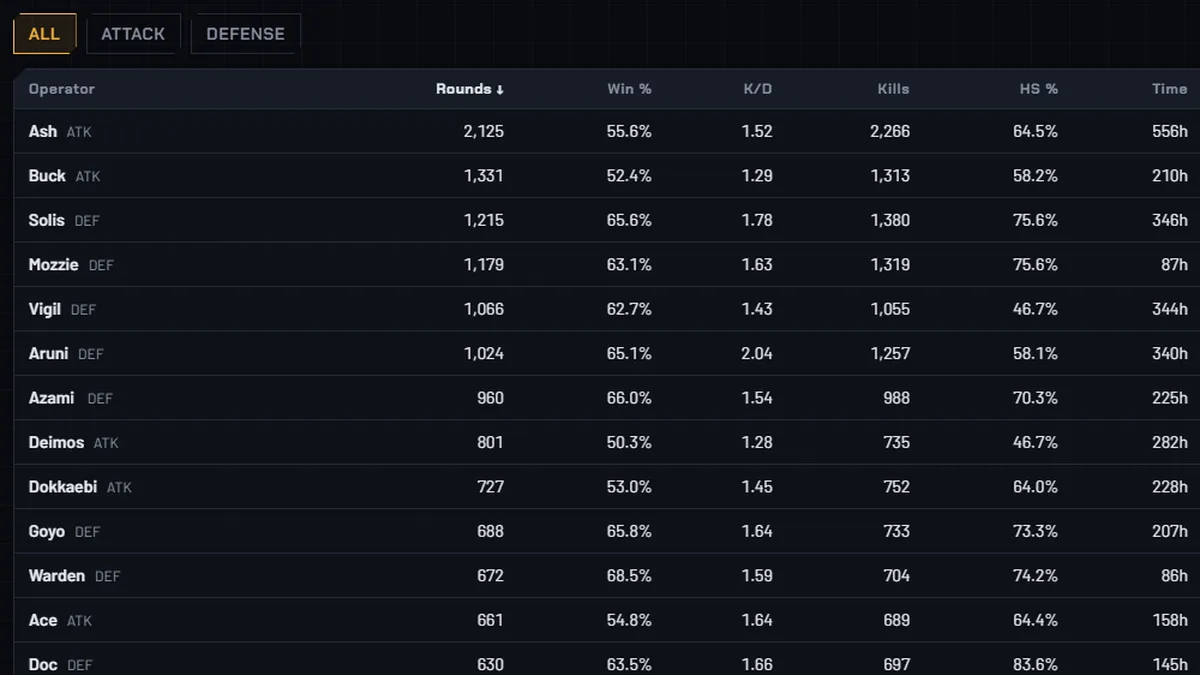
| Top operators | Rounds | Win % | K/D |
|---|---|---|---|
| Ash ATK | 2,111 | 55.5% | 1.52 |
| Buck ATK | 1,329 | 52.5% | 1.30 |
| Solis DEF | 1,192 | 65.7% | 1.79 |
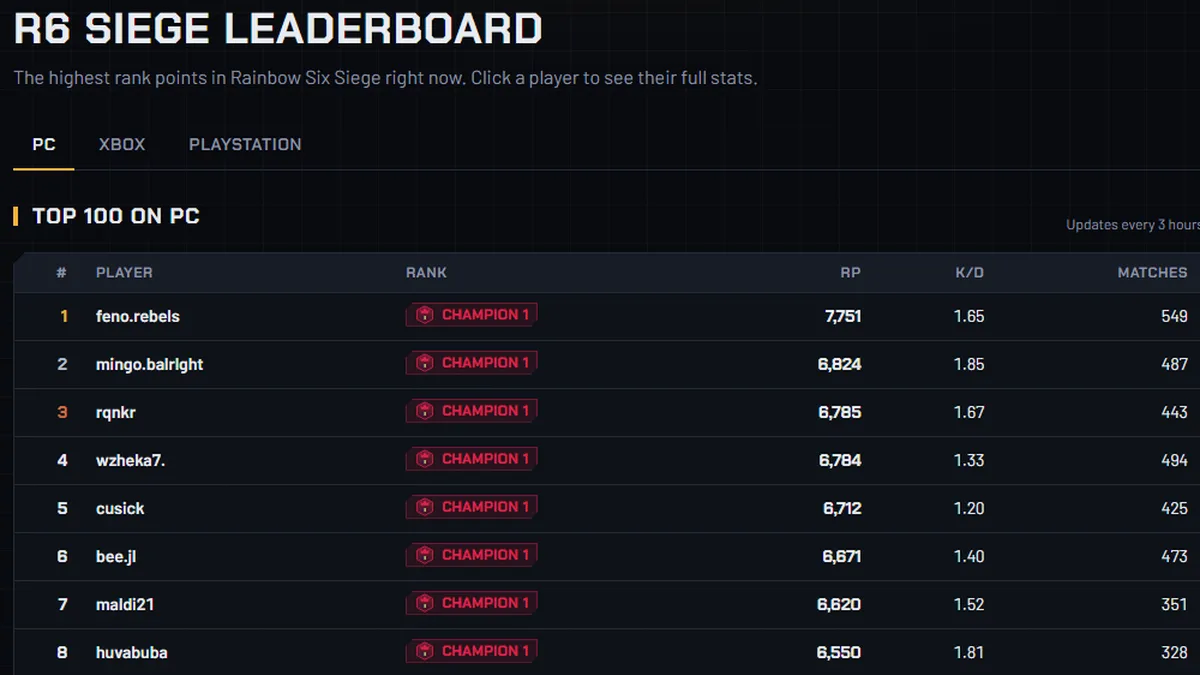
Top ranked on PC
| # | Player | Rank | RP | K/D | Matches |
|---|---|---|---|---|---|
| 1 | feno.rebels | Champion 1 | 8,575 | 1.67 | 737 |
| 2 | rqnkr | Champion 1 | 7,269 | 1.69 | 572 |
| 3 | wzheka | Champion 1 | 7,183 | 1.35 | 563 |
| 4 | maldi21 | Champion 1 | 7,056 | 1.52 | 481 |
| 5 | vdrillz.secret | Champion 1 | 6,636 | 1.80 | 294 |
Top ranked on console
| # | Player | Rank | RP | K/D | Matches |
|---|---|---|---|---|---|
| 1 | zsueioPSalso zsuelo | Champion 1 | 7,408 | 1.32 | 744 |
| 2 | crjixPS | Champion 1 | 6,873 | 1.38 | 674 |
| 3 | mejunejunePS | Champion 1 | 6,661 | 0.98 | 529 |
| 4 | kryiloPS | Champion 1 | 6,321 | 1.70 | 396 |
| 5 | ghostyz4131XBOXalso ghostyzontwitch | Champion 1 | 6,306 | 1.34 | 315 |
Rank and RP
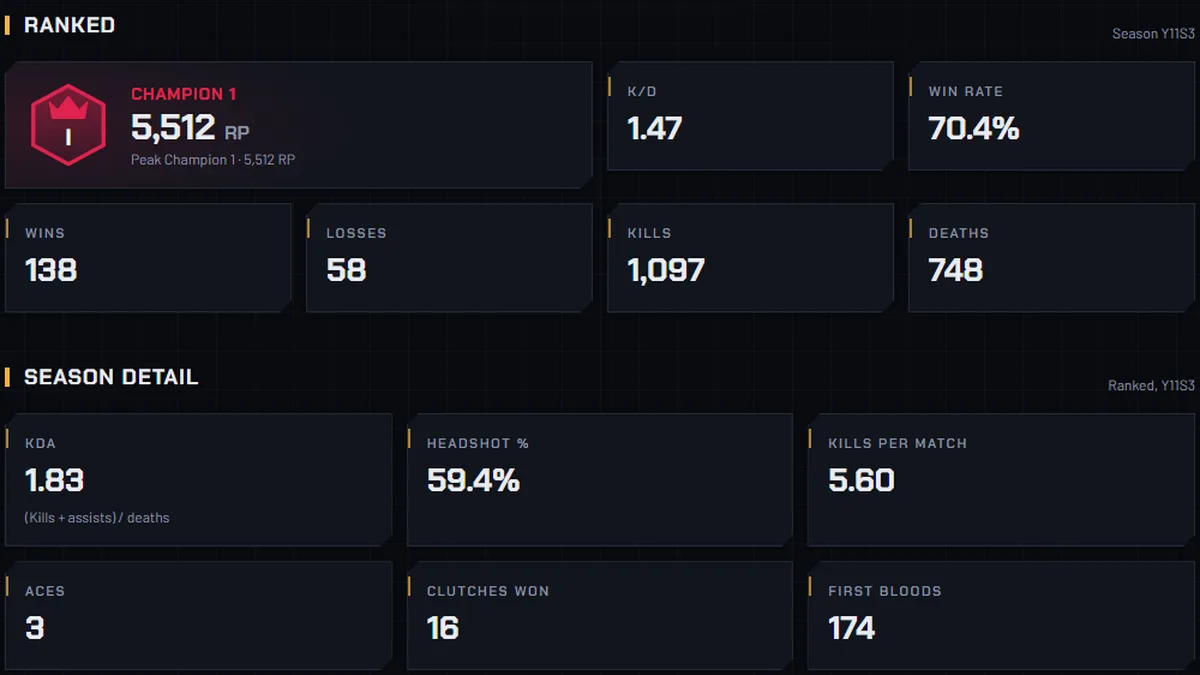
Current rank, rank points and peak rank for this season, updated after every lookup.
Operator stats
Every operator a player uses, with rounds, win rate, K/D, headshot % and time played.
Season history
Rank and results for every past season, back to Year 2 for veteran accounts.
See the R6 tracker in action
Siege Tracker
Do you want to see how well you are playing Rainbow Six Siege? Then try SiegeRadar, a Siege tracker for players who want to understand their performance in a simple way. You don't need to look only at wins and losses.
You can track important stats like K/D ratio, rank, rank points and headshot percentage. With the help of these numbers, you can see how you are really performing. SiegeRadar works for PC, PlayStation and Xbox, and your stats can be different on each platform.
What is a Siege Tracker?
A Siege tracker is a tool that helps Rainbow Six Siege players understand their game stats. It shows useful numbers, and you can use them to see how you are performing over time. It is useful for both new and experienced R6 players.
Some players use a Siege tracker just to check their current rank or K/D. It also lets you look at several stats together. For example, a good K/D does not mean a player is winning more matches. SiegeRadar is an independent resource and is not an official Ubisoft service.
What Can You Track With a Siege Tracker?
Rank
Your rank shows your current level in ranked matches. It helps you see where you stand in the Rainbow Six Siege ranking system, and you can use it to follow your progress during the season.
Rank Points
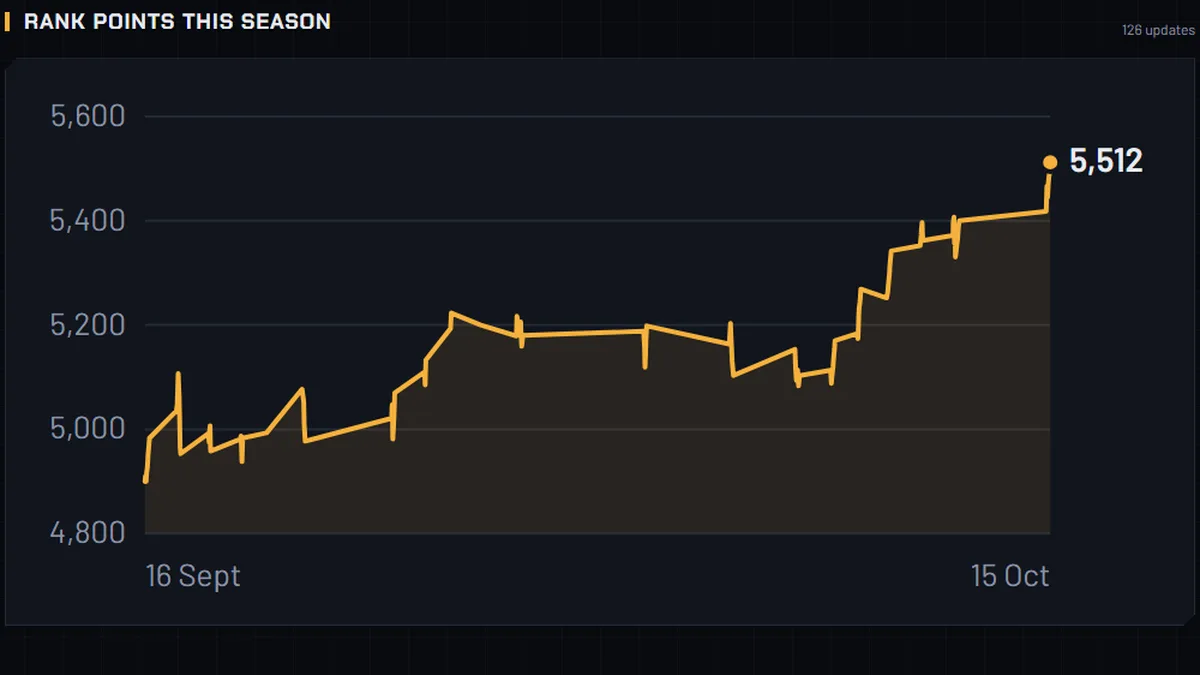
Rank points are also called RP. They show your movement up or down in rank: you gain RP after wins and lose RP after defeats. SiegeRadar shows a chart of your RP this season, so it is easy to see whether your progress is slowing down or improving.
K/D Ratio
K/D ratio compares your total kills with your total deaths. It gives a simple idea of your performance in gunfights. However, it should be checked together with other stats, because a good K/D alone does not show your full performance.
Win Rate
Win rate shows how many matches you win compared with the total matches you play. It helps you understand how often your performance leads to a win. Looking at your win rate together with your K/D gives a better picture of your overall impact.
Headshot Percentage
Headshot percentage shows how many of your kills come from headshots. It gives you an idea of your aim and crosshair placement. A high percentage shows that you are landing more accurate shots.
Matches Played
Matches played shows how many games are included in your stats. This number matters because a large number of matches gives a more reliable picture of your performance. A few good or bad games can change your stats quickly when the sample is small.
Kills Per Match
Kills per match shows the average number of kills you get in each game. It helps you understand your usual fragging output, and you can compare it over time to see how your performance changes.
Operators
Operator stats show your performance with different attackers and defenders. On the Operators tab of a profile you can compare rounds, kills, K/D, win rate and headshot % for each operator. This helps you find the operators that suit your play style.
Maps
Knowing where you perform well and where you struggle helps you decide which maps need more practice. Ubisoft does not share per-map stats for each player, so SiegeRadar does not show them; use the R6 map list to learn the maps in the ranked pool.
Weapons
Knowing which guns work best for you helps you pick loadouts. Per-player weapon stats are not available, but the R6 weapons database lists every gun and which operators carry it.
How Does Siege Tracker Work?
- 1Choose the platform you play on: PC, PlayStation or Xbox.
- 2Type your Ubisoft name, gamertag or PSN ID into the search box at the top of this page and press search.
- 3SiegeRadar fetches your Rainbow Six Siege stats for you; there is nothing to copy from the game or type in by hand.
- 4Check your current rank, rank points, K/D ratio and win rate on the profile.
- 5Review headshot percentage, kills per match and other useful stats.
- 6Open the Seasons tab to compare your current season with older seasons.
- 7Look at changes in K/D, win rate, rank and other important numbers.
- 8Find the areas where your stats are low, and check on the Operators tab which operators need more practice.
- 9Come back after several matches to see whether your changes are working.
How to Check Your Rainbow Six Siege Stats
- 1Use the correct Ubisoft username linked to your Rainbow Six Siege account. Similar usernames can exist, so check the spelling carefully before reviewing any stats.
- 2Choose the platform you play on, such as PC, PlayStation or Xbox. Your R6 player stats can be different across platforms, so pick the one you want to check.
- 3Look at your current rank, division and rank points. This gives you a quick idea of how your ranked matches are going.
- 4Check your total kills and deaths to understand your K/D ratio. This stat shows how often you get kills compared with how often you die.
- 5Review your wins and losses to see your win rate. This helps you understand how often your matches end in a win.
- 6You can also check stats such as headshot percentage, kills per match and matches played. These numbers give more detail about your overall performance.
- 7Check how you perform with different operators on the Operators tab. This helps you find your strongest and weakest areas.
- 8Compare your current Rainbow Six Siege stats with older seasons on the Seasons tab. This makes it easy to see how your rank, K/D and win rate have changed.
Rainbow Six Siege Rank System
The starting rank for players who are new to ranked matches. You improve your rank by winning matches and earning rank points (RP). This rank is a good place to learn maps, operators and basic team strategies.
Bronze is the next rank after Copper. At this level players improve their aim, understand enemy movement and work better with teammates. By playing consistently, players can move forward to Silver.
Silver players have a better understanding of the game's basic mechanics. They can focus more on teamwork, map knowledge and choosing the right operators. After improving these skills, players can reach Gold.
Gold is a middle rank where players have to make smart decisions during matches. Good communication, better positioning and proper use of gadgets play a big role. Players who stay consistent can move toward Platinum.
Platinum players have strong game knowledge and better combat skills. They pay attention to team strategies, map control and the opponents' movement. With consistent teamwork, players can progress toward Emerald.
A higher rank where matches become more challenging. Players need good aim, strong map awareness and effective communication. Players who learn from losses and adapt new strategies can move closer to Diamond.
One of the highest competitive ranks in Rainbow Six Siege. At this level, players have strong mechanical skills, detailed map knowledge and a good understanding of operators.
The highest of the eight main rank tiers in standard ranked progression. At this level, players have strong aim, smart decision making and excellent teamwork. Reaching it takes regular practice and consistent wins.
How to Improve Rainbow Six Siege Performance
Set a Baseline for Your Current Performance
Start by checking your current K/D ratio, win rate, rank and matches played. Note these numbers so you can compare them with your future results.
Identify Your Weakest Maps
Notice the maps where you lose more matches. Work on your map knowledge, better rotations and the important locations on those maps. Practicing these areas helps you make better decisions during ranked matches.
Review Operator Performance
Check which operators give you better results and which need more practice. Look at your kills, deaths and win rate with different operators. This helps you choose operators that match your playstyle.
Analyze Your Recent Matches
Instead of judging yourself on one game, review your recent results. The RP chart on your profile shows how your rank points moved over the season. Look for repeated problems, like losing early gunfights on certain maps.
Balance K/D Ratio with Win Rate
A high K/D ratio does not always mean you are helping your team win. Check your win rate too, to understand how often your matches end in victory. Looking at both stats gives you a better picture of your performance and helps you focus on teamwork.
Set Realistic Goals for Each Gaming Session
Use your current stats to set small, achievable goals before a session, for example learning one map better or playing more with your teammates. Check your stats after playing to see what has improved and what still needs practice.
Tracking Stats on Different Platforms
PC
- 1Open SiegeRadar, choose PC and type your Ubisoft username.
- 2Review your kills and deaths to understand your combat performance. You can also use the K/D calculator to work out the ratio from numbers in your game.
- 3Check your total wins and losses to understand how often you win matches.
- 4Look at the Ranked card to see your current rank and rank points.
- 5Review the RP chart and your recent results to look for patterns in your performance.
PlayStation
- 1Open SiegeRadar, choose PlayStation and type your PSN ID (PS4 and PS5 both use this option).
- 2Note your total kills and deaths to understand your combat performance, or test numbers in the K/D calculator.
- 3Check your wins and losses to see the share of matches you have won.
- 4Review your ranked profile to see your current rank and rank points.
- 5Look at your recent results and the seasons you performed best in.
Xbox
- 1Open SiegeRadar, choose Xbox and type your gamertag.
- 2Record your kills and deaths to understand your performance during combat.
- 3Check how many matches you have won and lost.
- 4Check your current rank and rank points.
- 5Compare your results with previous seasons on the Seasons tab to measure your improvement.
Is There an R6 Tracker App or Download?
You don't need to download anything to use SiegeRadar. It is a website, so it works in any browser on PC, Mac, phone or tablet. On your phone, open the site and use "Add to Home Screen" in your browser menu to get an icon that opens it like an app.
On a computer with Chrome, you can also add the free SiegeRadar Chrome extension. It is optional: click its icon to look up any player's rank, K/D and win rate, and keep your favorite players one click away.
If you want a downloadable R6 tracker, the main option is R6 Tracker from Tracker Network: a desktop app on Overwolf that shows stats for the players in your lobby, plus mobile apps for Android and iOS. Only install trackers from the official app stores or Overwolf, and never give a tracker your Ubisoft password. See our R6 tracker comparison for which app or website fits you.
Common Siege Tracker Problems and Solutions
Incorrect Player Stats
Sometimes a Siege tracker may show statistics that do not match the numbers in your game.
Fix: Make sure you are looking at the same season and game mode as in the game. SiegeRadar refreshes a profile at most every 15 minutes, so check again a little later if the numbers still differ.
Wrong Ubisoft Username or Platform
You may see incorrect or missing information if you select the wrong player profile or gaming platform.
Fix: Always double check the username and select the correct platform before checking stats. See what to do when a player is not found.
Missing or Outdated Statistics
Your latest match results may not appear immediately in the stat tracker.
Fix: Make sure you are viewing the correct season, and give Ubisoft and the tracker a few minutes to update. More fixes: R6 tracker not updating.
K/D or Win Rate Calculation Errors
Your K/D ratio or win rate may look incorrect if you enter the wrong numbers into a calculator.
Fix: Check your kills, deaths, wins and losses before calculating your results in the K/D calculator.
Lost Favorites or Browser Data
Your favorite players on SiegeRadar are saved in your browser, so clearing browser data or switching devices removes them.
Fix: Nothing is lost on our side: search the player again and add them back to your favorites.
Is Siege Tracker Useful for Players?
SiegeRadar is a useful resource for Rainbow Six Siege players who want to check their stats and track their progress. It is an independent tool and never asks for your Ubisoft password: you only type a player name.
Don't share your password or login codes with unknown websites, to protect your account, and always check the website address before using a tool.
Conclusion
SiegeRadar is a useful Siege tracker for players who want to keep track of their progress in one place. It helps you check your rank, K/D, win rate and operators, and shows how they change from season to season. Its simple features make it easy to understand your game and improve. As with any tool, use trusted websites and follow the game's rules.
Pros and Cons of Siege Tracker
✓ Pros
- It explains important stats like K/D ratio, win rate and headshot percentage in simple language.
- It is free and does not require you to create an account.
- Stats load automatically from your username: no typing numbers in by hand.
- It shows your rank, rank points and an RP chart for the season, plus every past season.
- By reviewing your stats, you can identify areas that need more practice, such as your aim or certain operators.
- It works for PC, PlayStation and Xbox players.
✕ Cons
- Stats come from Ubisoft, so a new match can take a few minutes to show up.
- Per-map and per-weapon stats for each player are not available.
- Favorites are stored in the browser on the device you use.
- Numbers like K/D ratio and win rate cannot explain every decision made during a match.
FAQ
Is SiegeRadar free?
Yes, it is free. You can check player profiles, ranks, K/D ratios and other game statistics without an account.
Is SiegeRadar safe?
Yes. SiegeRadar never asks for your Ubisoft password or login codes; you only type a player name. Never share your password with any stats website.
Can I check another player's R6 stats?
Yes. Enter the player's Ubisoft name, gamertag or PSN ID and choose their platform to see their Rainbow Six Siege stats.
Do I need to download an app to use SiegeRadar?
No. SiegeRadar is a website, so there is nothing you have to download or install. It works in any browser on PC and on your phone. If you use Chrome, there is also an optional free SiegeRadar extension from the Chrome Web Store that lets you look up a player's rank, K/D and win rate from your toolbar and keep a list of favorite players.
Can I track Rainbow Six Siege stats on Xbox?
Yes. Choose Xbox in the search box and type the gamertag.
Can I track R6 stats on PlayStation?
Yes. Both PS4 and PS5 players use the PlayStation option; search by PSN ID.
Can I see match history on SiegeRadar?
No. SiegeRadar shows season and lifetime totals for each player, plus their rank in every past season, but not a list of single matches or a live lobby. The How our stats work page lists exactly what is included.
What is a good K/D in Rainbow Six Siege?
A K/D ratio of 1.0 means you get about one kill for every death. A ratio above 1.0 is a good sign.
Is SiegeRadar an official Ubisoft tracker?
No. SiegeRadar is an independent resource and is not an official Ubisoft service.
R6 stats guides
- How to Check Your R6 Stats on Xbox and PS5Step-by-step: look up Rainbow Six Siege stats for any Xbox or PlayStation player, plus what to do when a console name will not show up.
- R6 Tracker Not Updating? 6 FixesWhy your Rainbow Six Siege stats tracker shows old numbers after a match, and how to get your rank, K/D and wins to update.
- R6 Tracker Says "Player Not Found"? How to Fix ItThe common reasons an R6 stats tracker cannot find a player on PC, Xbox or PlayStation, and how to search the right way.
- R6 Ranks Explained: All 40 Ranks, Rank Points and Ranked 3.0R6 ranks explained: all 40 ranks from Copper 5 to Champion 1 with their RP, how RP and placements work in Ranked 3.0, Competitive Rewards, Legend Division and Y11S4 changes.
- R6 Rank Distribution: % of Players per Rank (Official Data)Official Ubisoft R6 rank distribution for PC and console: the share of players in every rank and division, the average rank, what's changed since Ranked 3.0, and the live RP spread of the top 100.
- Best R6 Operators: What Top Players Actually PickBest R6 operators from real data: the attackers and defenders top PC leaderboard players pick most, with their round win rate, K/D and how we built the list.
- R6 Marketplace: Is It Back? Status and HistoryIs the R6 Marketplace back? What Ubisoft has confirmed about why it closed on 27 December 2025, its status now, what changed instead and how to spot fake sites.
- Season vs Lifetime R6 Stats: What Each Number Tells YouSeason vs lifetime R6 stats explained with a real profile: what each covers, why K/D and win rate differ between them, and which one to check for what.
- Is Rainbow Six Siege Shutting Down? No, R6 Mobile IsIs Rainbow Six Siege shutting down? No: Ubisoft is ending Rainbow Six Mobile on 15 January 2027. What was announced, and what live player counts show for Siege.
- What Are Battle Points in R6? How They Work in the Battle PassWhat are Battle Points in R6? How you earn them, how they level the Battle Pass into tokens and rewards, and how they differ from Renown and R6 Credits.
- Is Rainbow Six Siege Free? What Free Access IncludesIs Rainbow Six Siege free? Since Siege X in June 2025, Free Access covers Quick Match and Unranked. What is free, PS Plus and Game Pass, and how Ranked unlocks.
- How to Get Out of Dishonorable in R6: Reputation System ExplainedHow to get out of Dishonorable in R6: the five Reputation standings, what each one locks or rewards, and what Ubisoft says raises your standing again.
- Rainbow Six Siege Twitch Drops: How to Link, Watch and ClaimRainbow Six Siege Twitch drops explained: how to link Ubisoft and Twitch, which streams count, how to claim, what to check when drops are not working.
- R6 Error 49666: How to Fix the QB Anti-Cheat ErrorFix Rainbow Six Siege error 49666, the QB Anti-Cheat launch error after switching Ubisoft accounts: delete the multiexe folder, plus what does not help.
- QB Anti-Cheat in R6: What It Is and Why It Shows ErrorsQB Anti-Cheat in R6 explained: Ubisoft's QB System, how it works with BattlEye, MouseTrap and ShieldGuard, and what to do when a QB error stops Siege launching.
- Is There Aim Assist in R6? Console, PC and Siege XIs there aim assist in R6? Not in multiplayer on any platform. What the menu option does, mouse and keyboard on console since 2026, and controller settings.
- R6 Y11S4 Operation Vital Signal: Release Date and Every ChangeR6 Y11S4 Operation Vital Signal goes live 1 December 2026: Doc remaster, the new MBZ-19, ACS12 and TCSG12 nerfs, the ranked split, Bank changes and events.
- R6 Ranked Split: Solo/Duo vs Flex and the Y11S4 Rank ResetR6 ranked splits into Solo/Duo and Flex in Y11S4. Who can queue where, separate ranks, no four-stacks, level 30 for ranked and the 500 RP soft reset.
- Good K/D in R6: What the Top 100 Players Actually HaveWhat is a good K/D in R6? Real K/D numbers from the live top 100 on PC and console, what 1.0 means, whether K/D resets each season and if it matters.
- R6 Black Ice: What It Is and How to Get ItR6 Black Ice explained from our game data: the Epic Y1S1 weapon skin, where it comes from, the six Black Ice charms, and why we give no drop rate or price.
- Buying R6 Siege as a Gift: PS Plus, Split Screen, Size, RatingBuying R6 Siege as a gift? Do you need PS Plus or Game Pass, is it split screen, how many GB it is, what it is rated, and how to give R6 Credits.